The backoffice

Everything the desk needs, and nothing it should not see.

25 screens across 6 areas. Below is each one: what it does, what it can do, and — where it matters — why it behaves the way it does rather than the way you might expect.

Overview

What is happening right now, and what happened today. The first screen a trading desk opens in the morning and the one it leaves up all day.

Dashboard

Today’s book at a glance, refreshed while you watch

Turnover, liability, settlement and traffic on one screen. It answers the two questions a manager asks first — how much is on, and how much could go out — before anyone has to open a report.
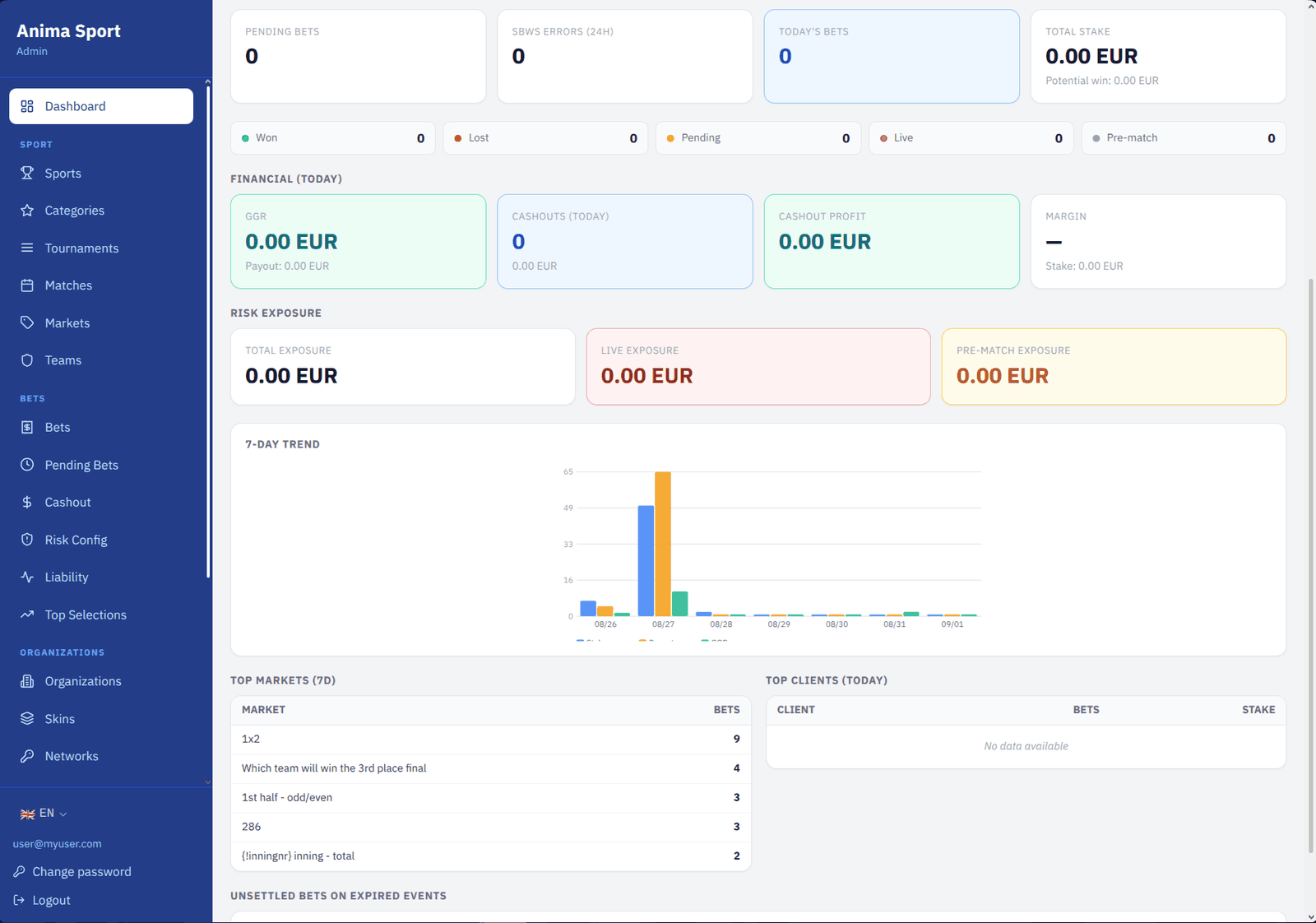
The dashboard: today’s turnover, open liability and the seven-day trend.
Today in numbers
Bets placed, total stake, potential payout, and the split between settled, won, lost and still running.
Live and pre-match, counted honestly
A coupon counts as live when any of its legs was placed in play, which is the same rule the bet list shows. Counting the coupon flag alone made the two screens disagree, so it no longer does.
Financials
Payout and GGR for the day, cashout volume and cashout profit, each measured against settlement date rather than placement date.
Open liability
Everything still running, split live against pre-match, so the desk knows its exposure without waiting for a scan.
Seven-day trend
Stake, payout and GGR by day, so a bad afternoon is visible as a shape rather than a number that looks unusual out of context.
Top markets and top players
The five markets carrying the most coupons this week and the five players staking the most today.
Unsettled but finished
Coupons whose events have all ended and which are still open — the queue that quietly grows when a settlement feed hiccups.
Live activity

Who is connected, and what they are betting on

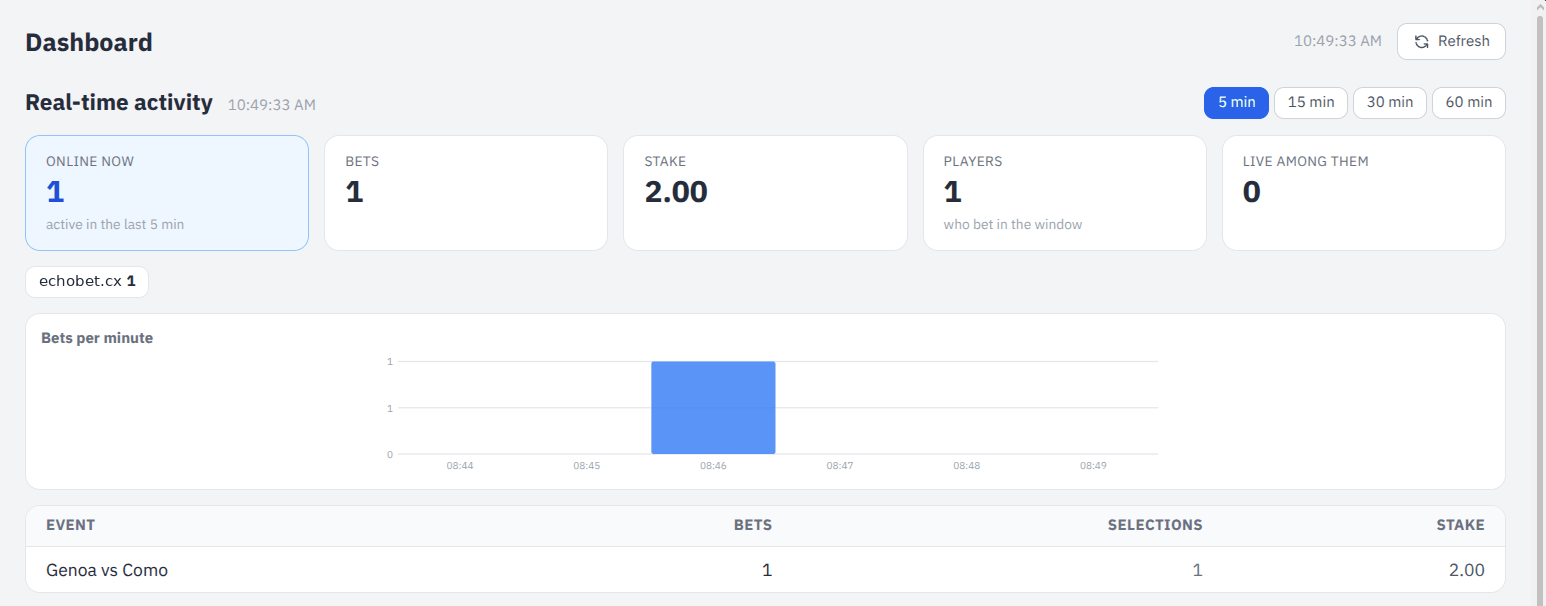
A separate, lightweight view that polls every few seconds while the page is open. It exists because a traffic spike is something you want to see as it happens, and the full dashboard is far too heavy to run at that rate.

Live activity: players online per brand, bets per minute, and the events taking them.
Players online, by brand
Presence counted by the betting engine and named with your skins, so a spike can be traced to the brand it came from.
Bets per minute
A rolling window, drawn as a shape. A surge reads as a shape long before it reads as a number.
What they are on
The events taking the most coupons in the window, counted once per coupon — a bet with two selections on the same match is one bet.
Window you choose
From one minute to three hours, so the same panel serves a live kickoff and a quiet afternoon.

Trading desk

Everything a trader touches during a shift: the bets that came in, the ones waiting for a decision, and where the money is piling up.

Bets

Every coupon, searchable, with the whole story behind each one

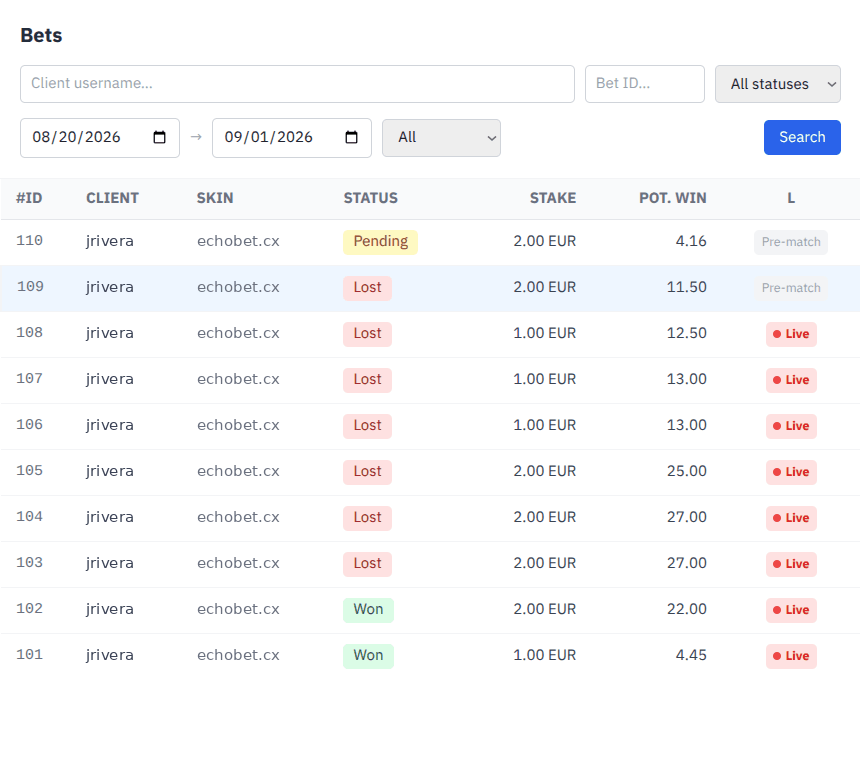
The register of everything placed. Filter it down to what you are looking for, then open a coupon to see each selection, the odds it was taken at, and what has happened to it since.

The bets register with its filters, brand column and live indicator.
Filters that match how you search
By player, coupon number, status, date range, and live against pre-match. Empty filters mean "everything" rather than nothing.
Brand column
Which skin the coupon was placed on, shown in the list and repeated in the detail, so an operator running several brands never has to infer it from the player name.
Selection detail
Every leg with its market and outcome resolved to readable names — handicaps and totals substituted in, outright runners looked up — plus the odds taken and the current state of the event.
Live legs marked as such
A coupon shows Live, Pre-match or Mixed from what its legs actually were, and the indicator only pulses while the coupon is still running. A settled bet keeps the label and loses the animation.
Manual settlement
Settle a coupon as won, lost or void when the feed cannot, with the decision recorded against the operator who made it.
Wallet call log
Every request and response exchanged with the wallet for that coupon, with the automatic retry state alongside — so you can tell "still retrying" from "needs a person" without guessing.
Manual resend
Push the wallet notification again when a call failed, refused when the last one already succeeded so nobody double-credits an account.

Coupon detail

One bet, opened all the way up

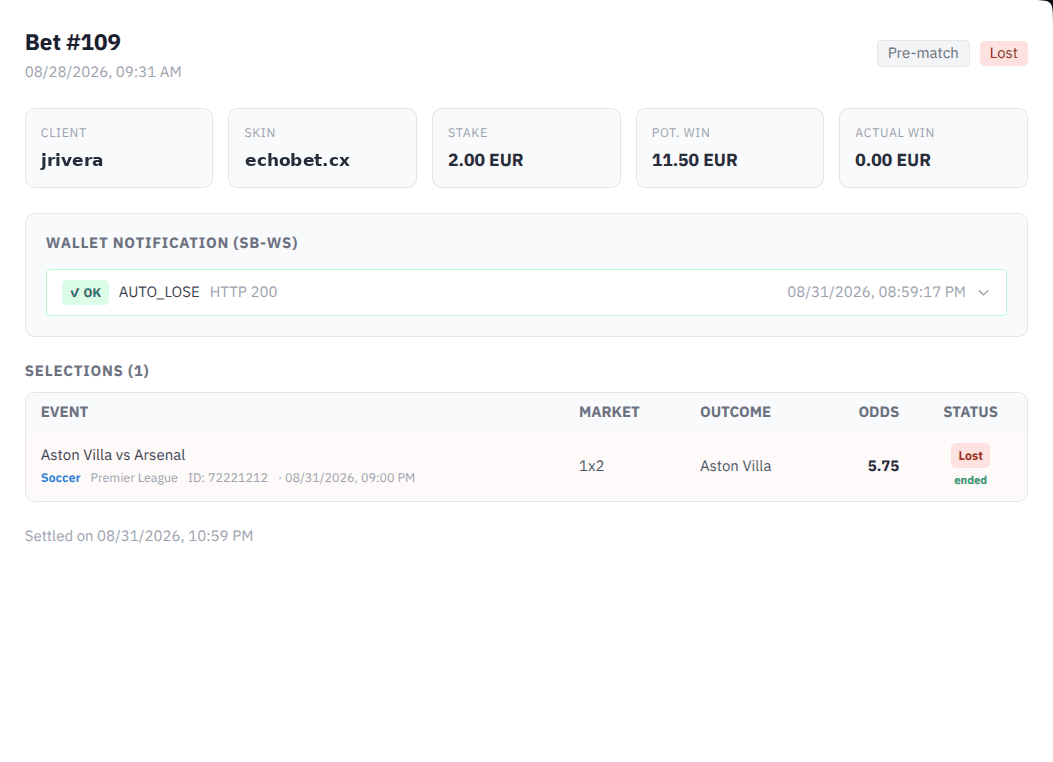
Everything known about a single coupon on one panel: player, stake, potential return, each selection, the wallet conversation, and the settlement trail.

A coupon opened: selections, odds, wallet calls and settlement.
Readable selections
Market and outcome names come from the catalogue with the competitors, handicap and total already substituted, so a leg reads "Asian Handicap −1.5, Home" rather than a key.
Per-leg status
Each selection carries its own state and the state of its event, so a coupon held up by one unfinished match explains itself.
Everything the wallet said
Request and response bodies, HTTP status and error text, newest first.

Acceptance queue

Bets that need a trader before they stand

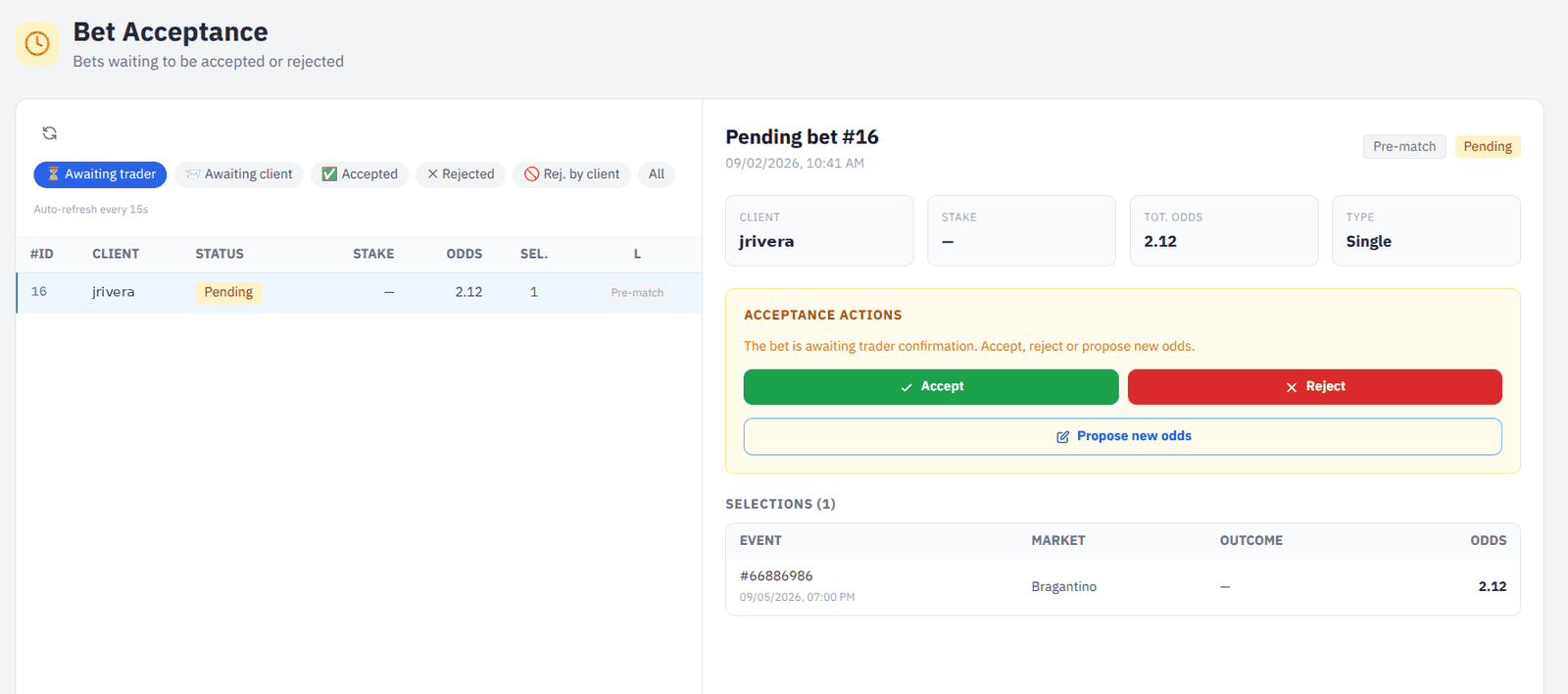
When a coupon crosses a risk limit the engine holds it instead of taking it. It lands here, and a trader accepts it, refuses it, or offers different odds back to the player.

The acceptance queue with accept, refuse and counter-offer.
Accept
The engine places the coupon, debits the account and it goes live, exactly as an automatically accepted bet would have.
Refuse
Marked refused, no money moves, and the player is told in the betslip.
Counter-offer
Send different odds back on any selection. The player sees the offer and accepts or declines it; nothing is placed until they do.
The whole coupon in front of you
Stake, total odds, every selection with its event and market, and whether the request came from live play.

Top selections

Where the money actually is, grouped by outcome

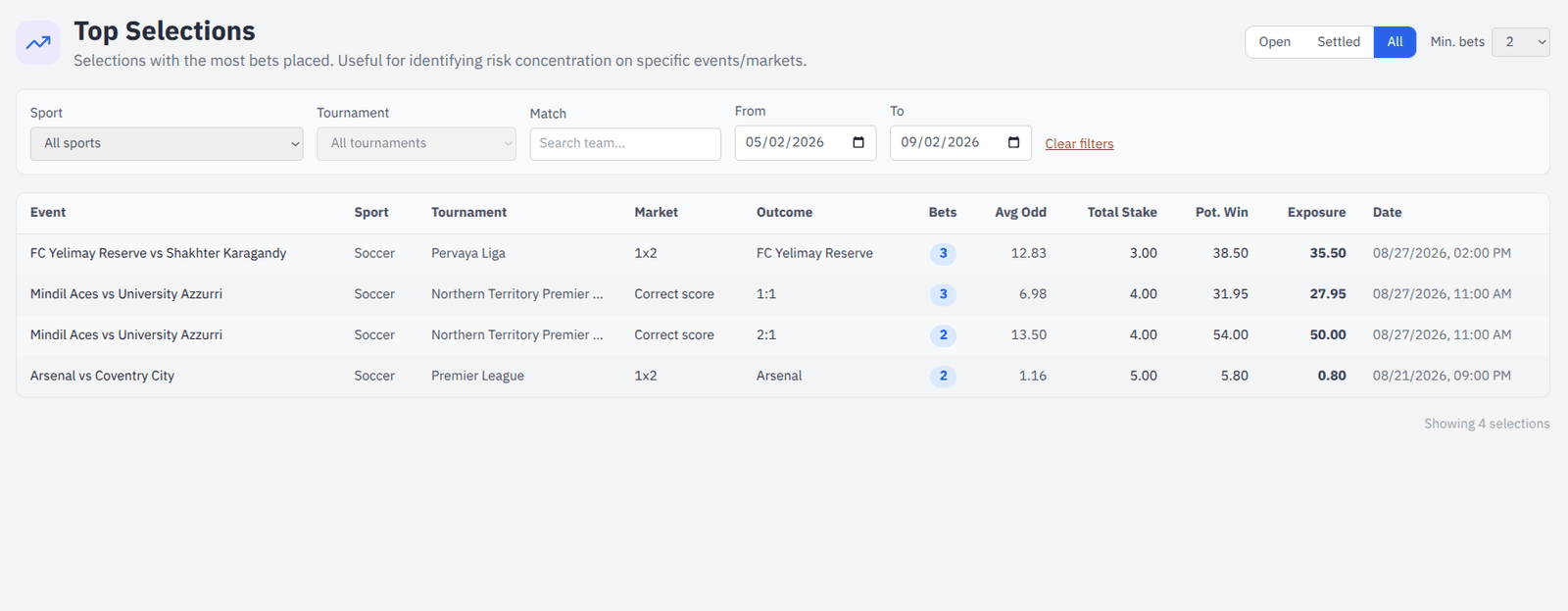
Coupons rolled up by event, market and outcome. It answers "what are they all backing" in one table, which is the question that precedes every decision to move a price.

Selections ranked by how many coupons and how much exposure they carry.
Grouped by outcome
Number of coupons, average odds taken, total stake, total potential payout and net exposure for each event-market-outcome.
Narrow it down
By sport, competition, team name and date, over open bets, settled bets, or both.
Minimum coupon count
Hide outcomes carrying fewer than N bets, so a long tail of single coupons does not bury the concentration you are looking for.

Risk management

The limits that decide what gets taken automatically, and the watch that tells a human when something needs looking at.

Liability monitor

An automatic watch that proposes, and never acts alone

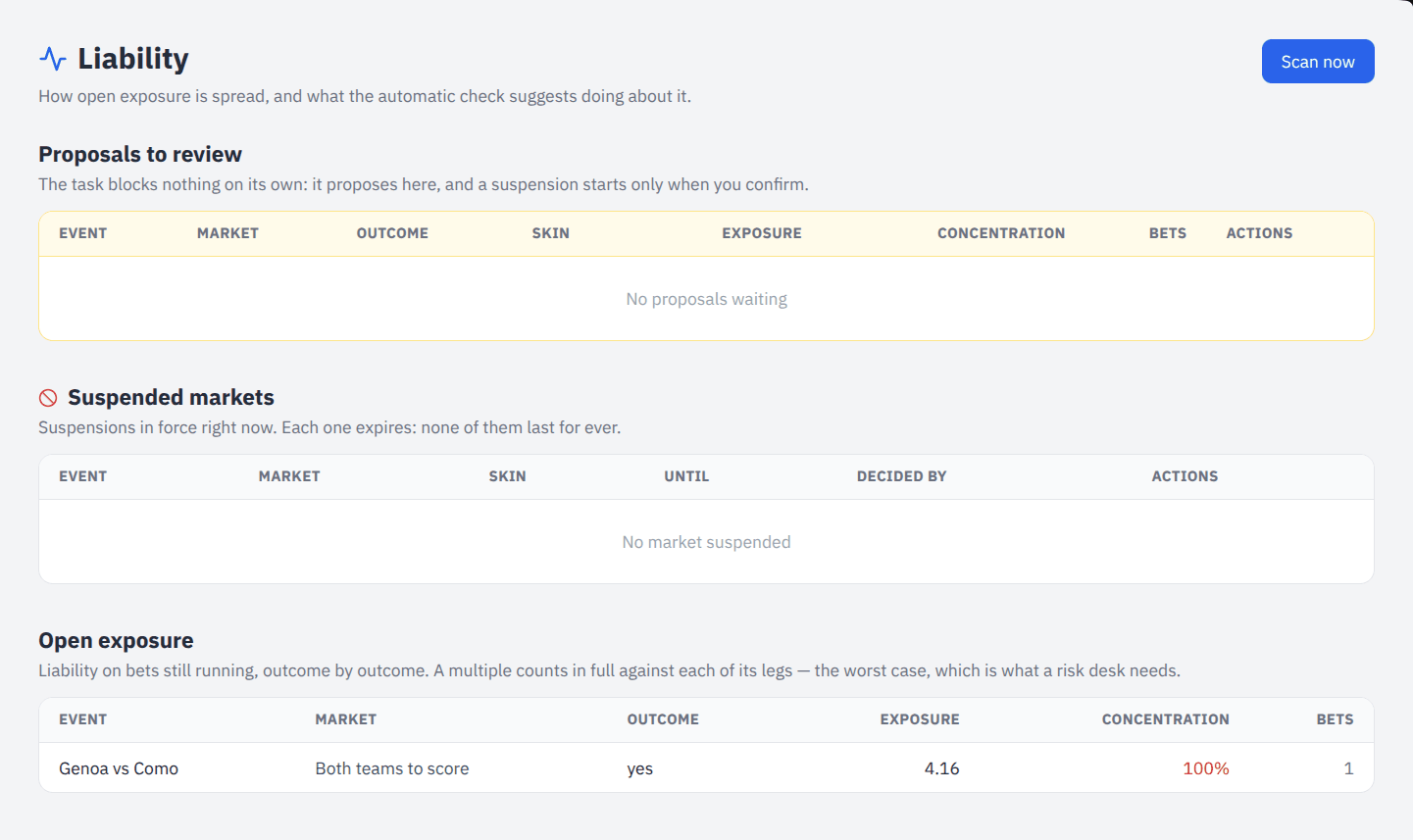
A scheduled scan measures how open exposure is spread across the outcomes of each market. When too much of a market’s liability sits on one result, it raises a proposal for the trading team. Confirming the proposal is what suspends the market — the scan never reaches a player by itself.

Liability proposals awaiting a decision, with live exposure beneath.
Concentration, not just size
A market is flagged on the share one outcome holds of the market’s own liability, above a floor you set, so a large but balanced book is left alone.
A proposal, with its reasoning
Each row states the event, market and outcome, the exposure, the share, the stake and the number of coupons behind it — so the trader is not asked to trust a verdict.
Confirm, edit or dismiss
Confirm as proposed, shorten or lengthen the suspension first, or wave it away. Dismiss all clears the queue in one statement rather than one call per row.
A dismissal that sticks
Something waved away does not come back on the next scan. It returns only if the concentration grows materially past where it was dismissed — which is new information, not a repeat.
Finished events fall off
Once an event closes, or the exposure behind a proposal is settled and paid, the row retires itself. Asking a trader to protect money that has already gone out is noise.
Thresholds you own
Minimum exposure, concentration percentage, default suspension length and scan interval, all changed from the settings page without a deployment.
Suspensions on record
Every suspension is bounded — one nobody remembers to lift is lost revenue — and lifting one early keeps the row so the decision stays auditable.

Risk configuration

The limits the engine applies before a human sees anything

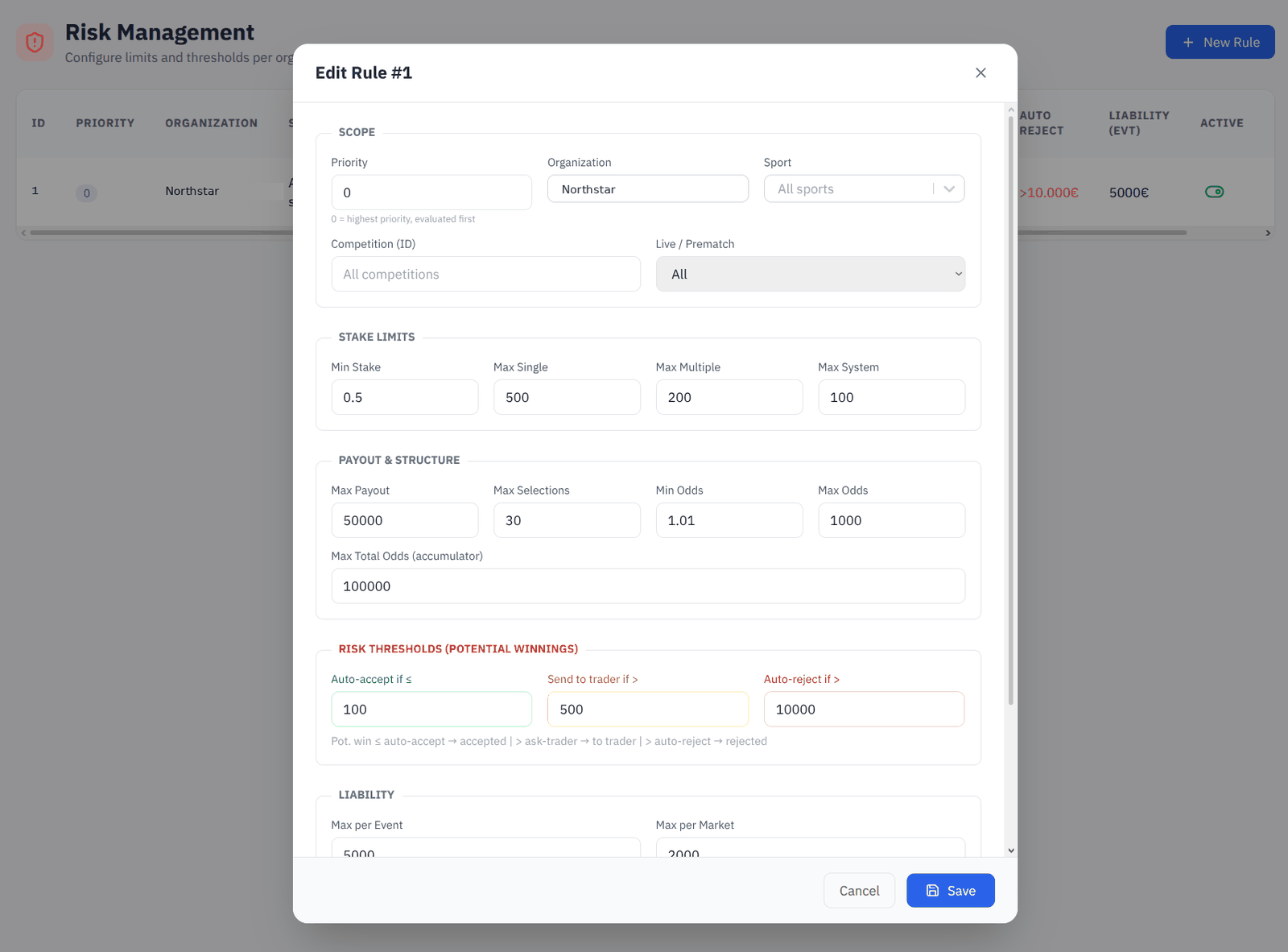
Stake ceilings and acceptance rules, layered by brand, sport, competition and whether the bet is live. The engine reads these on every placement; anything over the line goes to the acceptance queue rather than being refused outright.

Risk rules layered by brand, sport, competition and live flag.
Layered by specificity
A rule can apply to a whole brand, a sport within it, or a single competition, with a priority deciding which one wins.
Live and pre-match separately
The same competition can carry different limits in play, which is usually where it matters.
Per bet type
Minimum stake, and maximum stake for singles, multiples and systems independently.
Applied immediately
Saving a rule tells the betting engine to reload; there is no wait and no restart.

Cashout configuration

Where cashout is offered, and at what margin

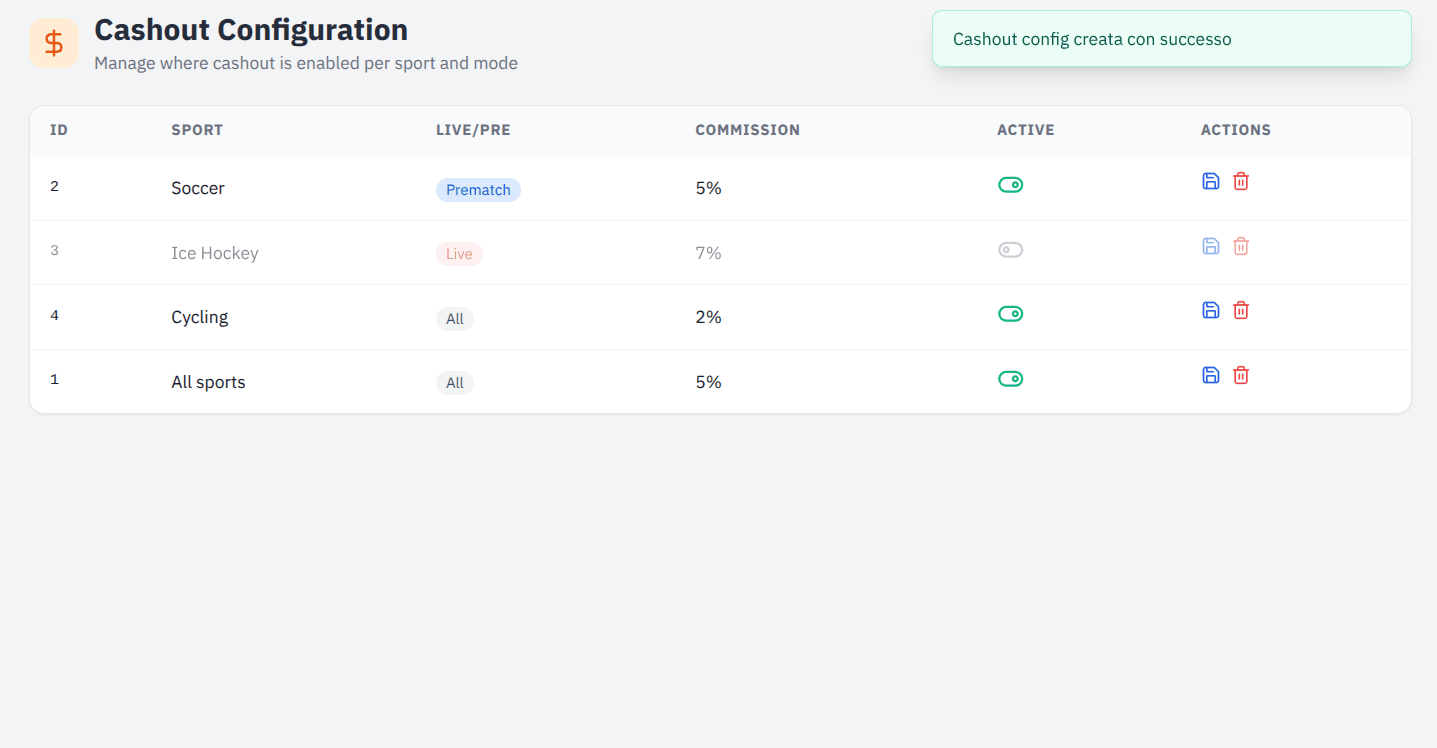
Cashout switched on per sport, separately for live and pre-match, with the commission the house keeps on each.

Cashout rules per sport, with live and pre-match commission.
Per sport, per phase
Enable cashout on the sports where the pricing supports it and leave it off where it does not.
Commission
The margin taken on a cashed-out coupon, set per rule.
One switch
Toggle a rule off without deleting it, so a temporary stop does not cost the configuration behind it.

Sport catalogue

What the feed delivers and how it is presented. Shared across every brand on the platform — there is no such thing as one operator’s own football.

Sports

The top of the tree, with the artwork that goes with it

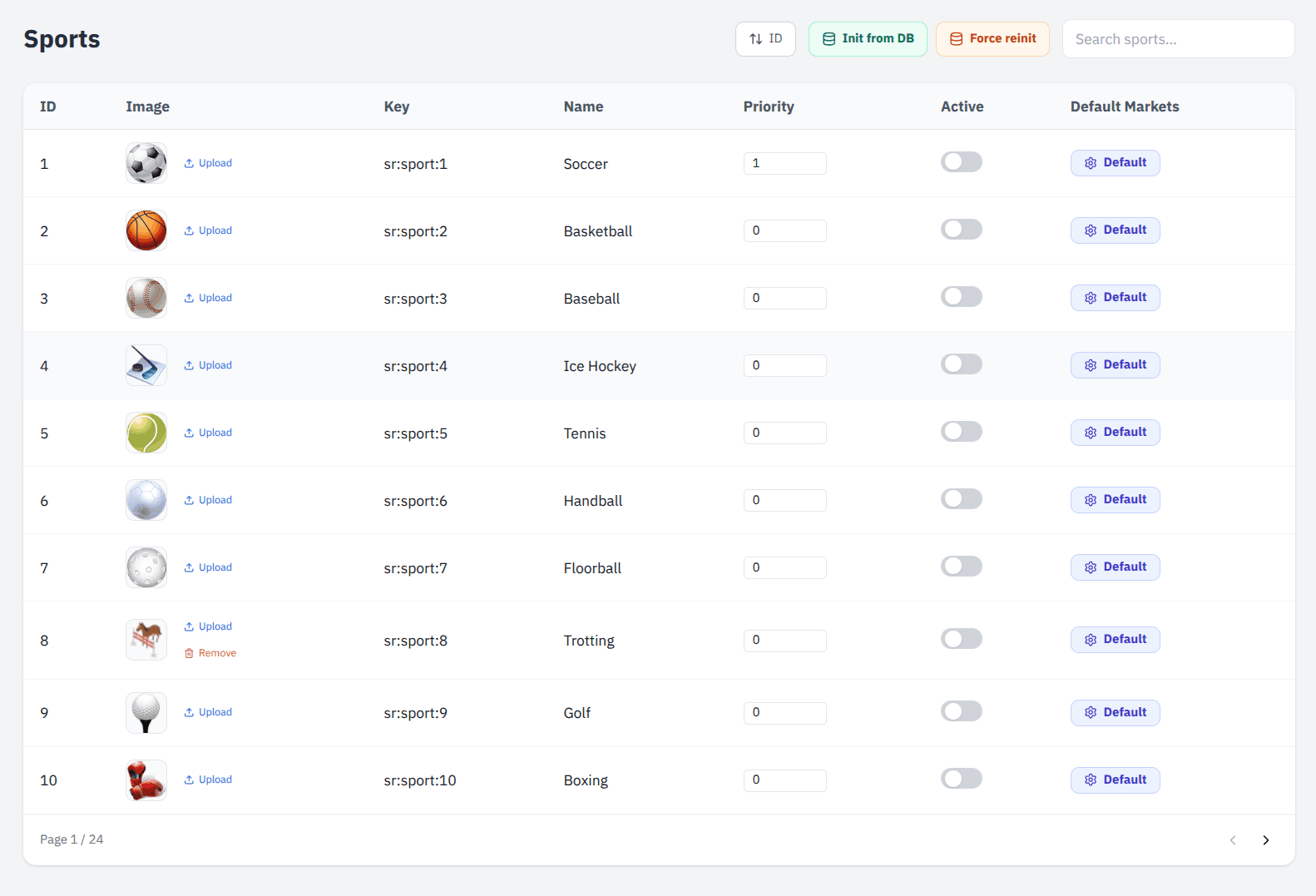
Every sport the feed carries, with display order, visibility and a custom icon where the default does not suit the brand.

The sport list with ordering, visibility and icons.
Show or hide
A sport can be carried by the feed and hidden from players.
Ordering
The order players see, set explicitly rather than inherited from whatever the feed sends first.
Custom artwork
Upload an icon per sport; it reaches the player frontend without a release.

Categories

Countries and regions under each sport

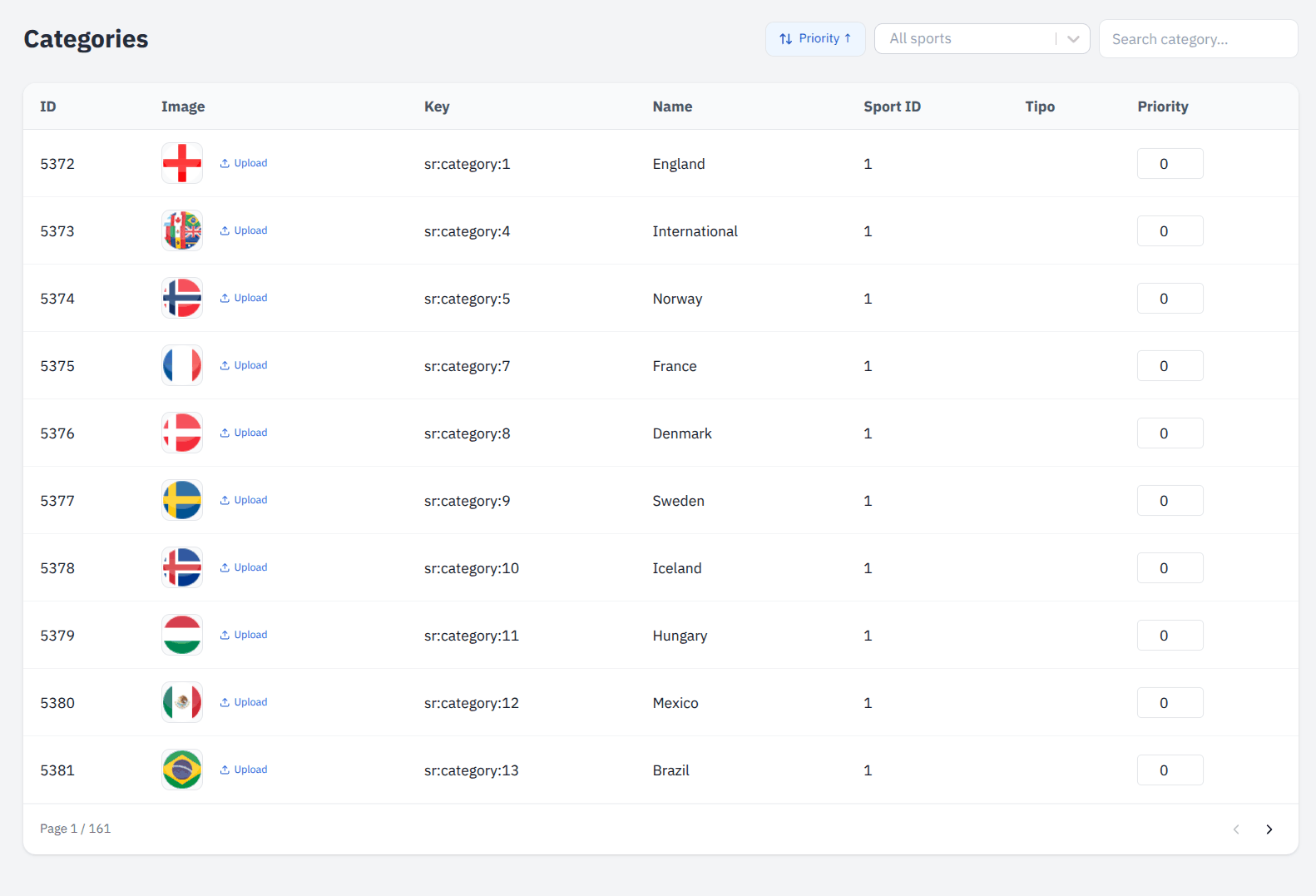
The middle layer of the catalogue — England under Football, ATP under Tennis — with the same visibility and artwork controls.

Categories under a sport, with flags.
Per sport
Filtered to the sport you are working on rather than one flat list.
Visibility and artwork
Hide a region, or give it a flag that matches the brand’s styling.

Tournaments

Competitions, and which ones you actually offer

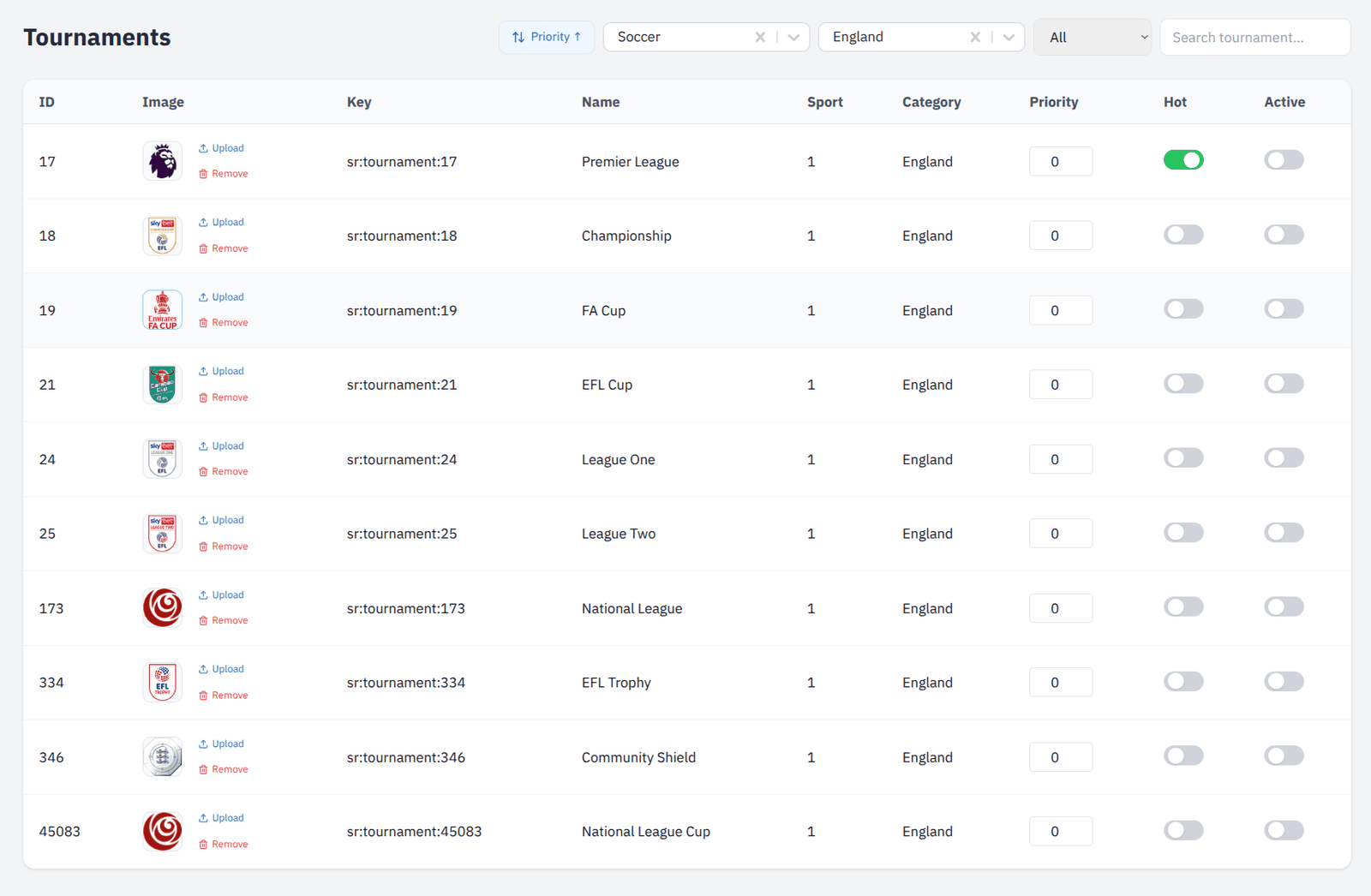
Every competition the feed carries. Enable the ones you want, order them, and give the ones that matter their own artwork.

Competitions filtered to England, with priority, Hot and Active.
Search across the tree
Find a competition by name without walking down from the sport, or narrow the list by sport and country first.
Active and Hot
Two switches. Active decides whether the competition is offered at all; Hot lifts it to the front of the player’s list — the Premier League on a Saturday, not the fourth tier.
Priority, and a stable order
Priority sets the order. Rows that share one fall back to their id, so a competition does not move between pages while you are reading them.
Its own artwork
Upload a logo for a competition and it overrides the one the feed ships; remove it and the feed’s own is back. No release either way.

Matches

Fixtures as the feed delivers them

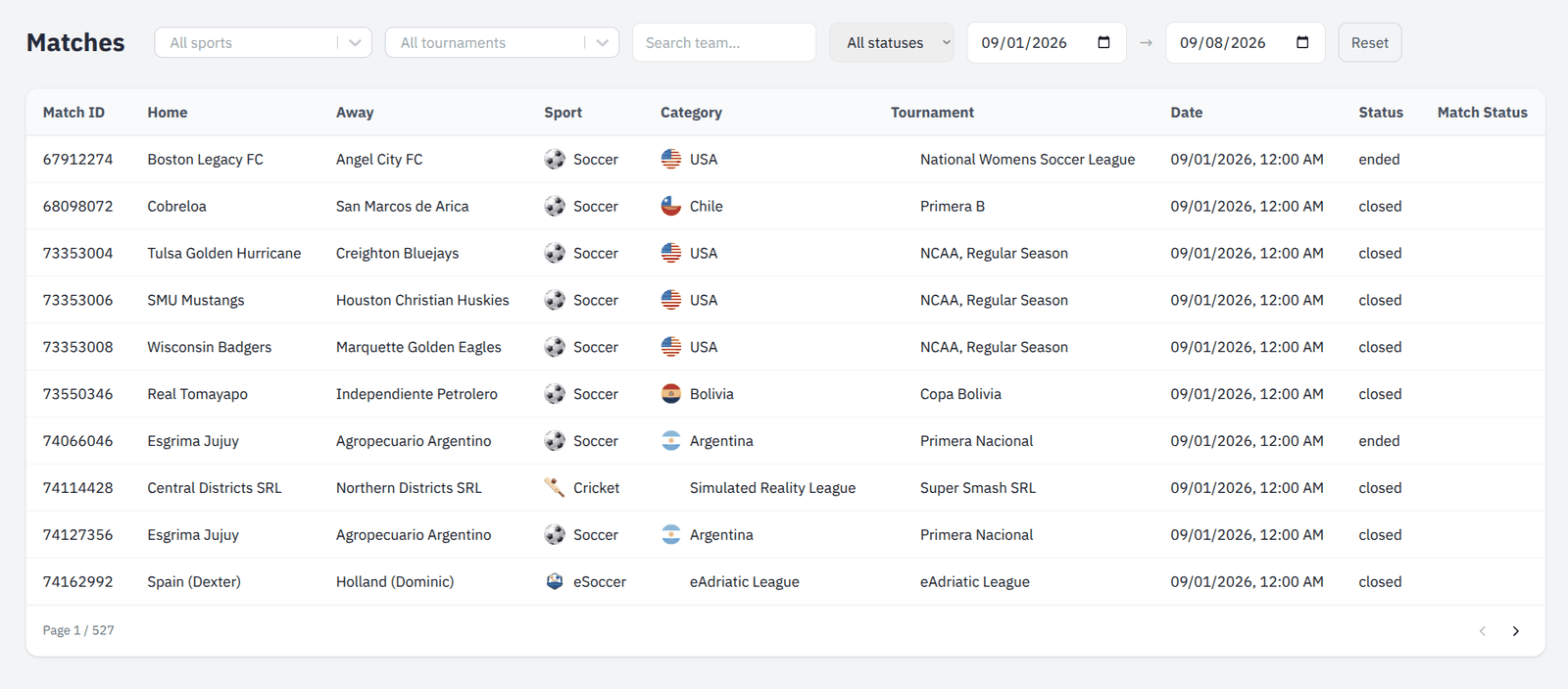
Every event with its scheduled time, competitors and current state. The screen you open when a trader asks why a match is not showing.

Fixtures across every sport the feed carries, filtered to a date range.
State at a glance
Not started, live, ended, closed — read from the feed rather than inferred. Alongside it, the match status the feed reports for a game in play.
Narrowed six ways
Sport, competition, competitor, state, and a date range rather than a single day — a week of fixtures runs to hundreds of pages.
Everything the feed carries
Not only football: esports and simulated leagues sit in the same catalogue, on the same screen, priced and settled the same way. The player frontend gives them their own tabs.

Markets

The market dictionary, and the default set per sport

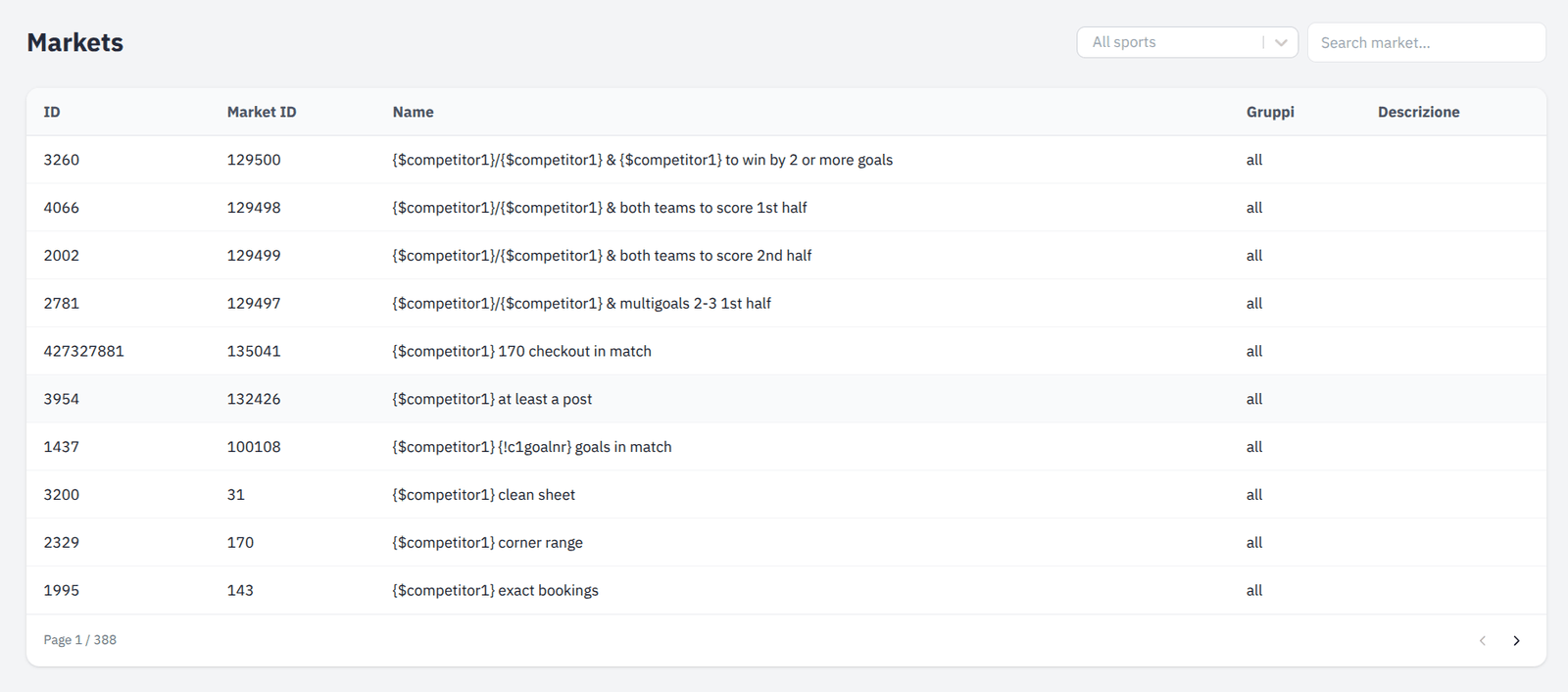
Every market type the feed can send, its outcomes, and which ones appear by default on a match card before a player opens it.

The market dictionary: names carry their placeholders until a match fills them in.
The templates, as the feed defines them
Names are stored with their placeholders in place — "{$competitor1} clean sheet", "{!c1goalnr} goals in match". This screen shows them that way on purpose: it is the dictionary, and the dictionary has no match to fill them from.
Filled in wherever a market meets an event
The competitors, the handicap and the total are substituted at the point of display — on a match card, in the betslip, and on every selection of a settled coupon in the Bets screen.
Searchable across 388 pages of them
By name and by sport. A feed carries thousands of market types and you will be looking for one.
Default markets per sport
The two or three markets shown on a match card before a player opens it, chosen per sport from the Sports screen.

Teams

Competitor names and badges

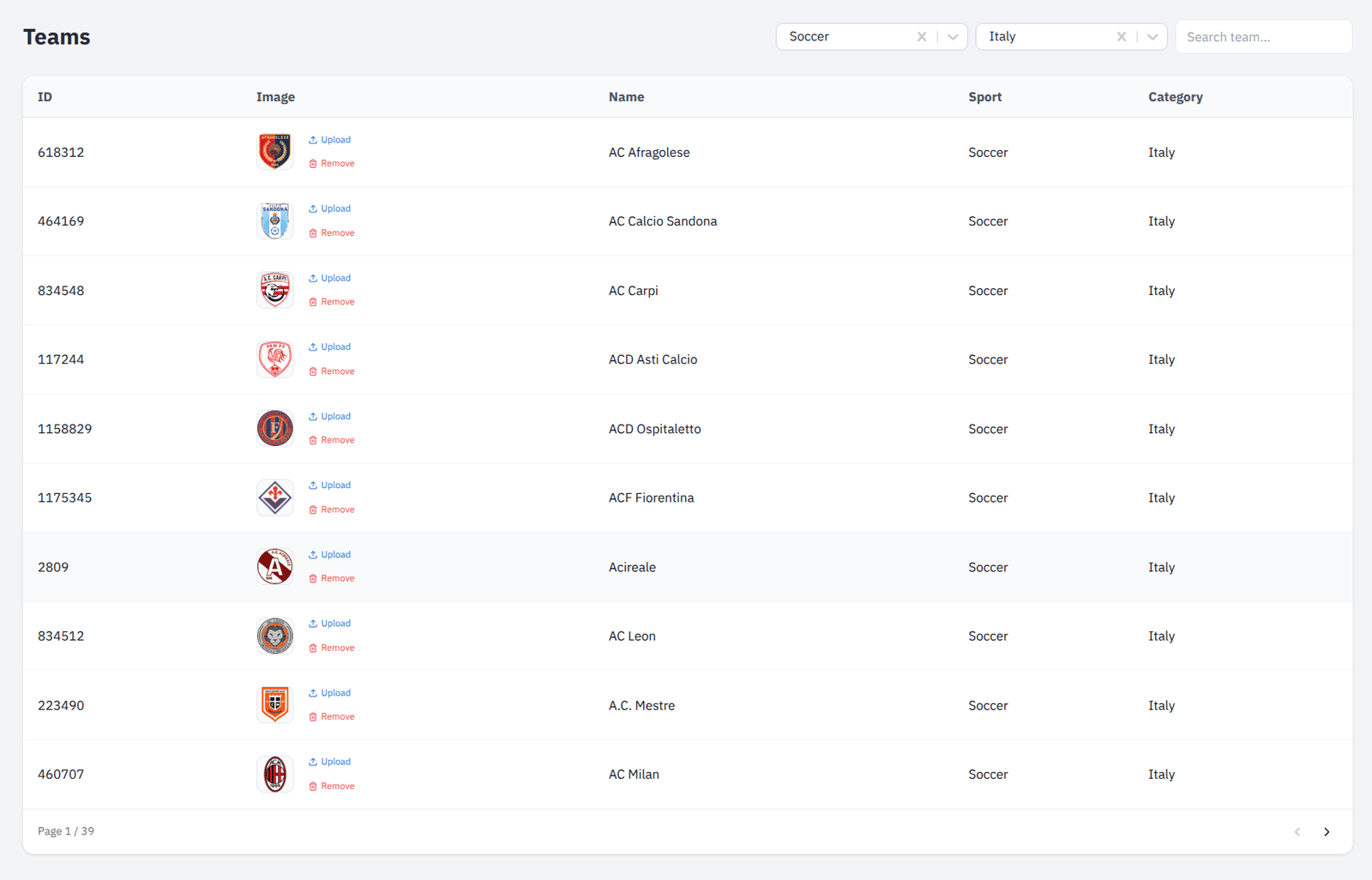
The competitor directory behind every fixture, with the artwork players see on a match card.

The competitor directory, filtered to one sport and one country.
Narrowed before it is searched
By sport and by country first, then by name. The directory runs to tens of thousands of competitors, and picking the right AC out of them starts with saying which country.
Search that stays quick
Backed by a materialised view rather than a scan, so a directory this size answers as fast when it is full as when it was empty.
Badges, added and taken away
Upload a crest per competitor, or remove one that is wrong. It reaches the player frontend without a release.

Brands and players

One platform, many brands. An organisation is a customer; a skin is one of its sites. Everything a player does is attached to the skin they did it on.

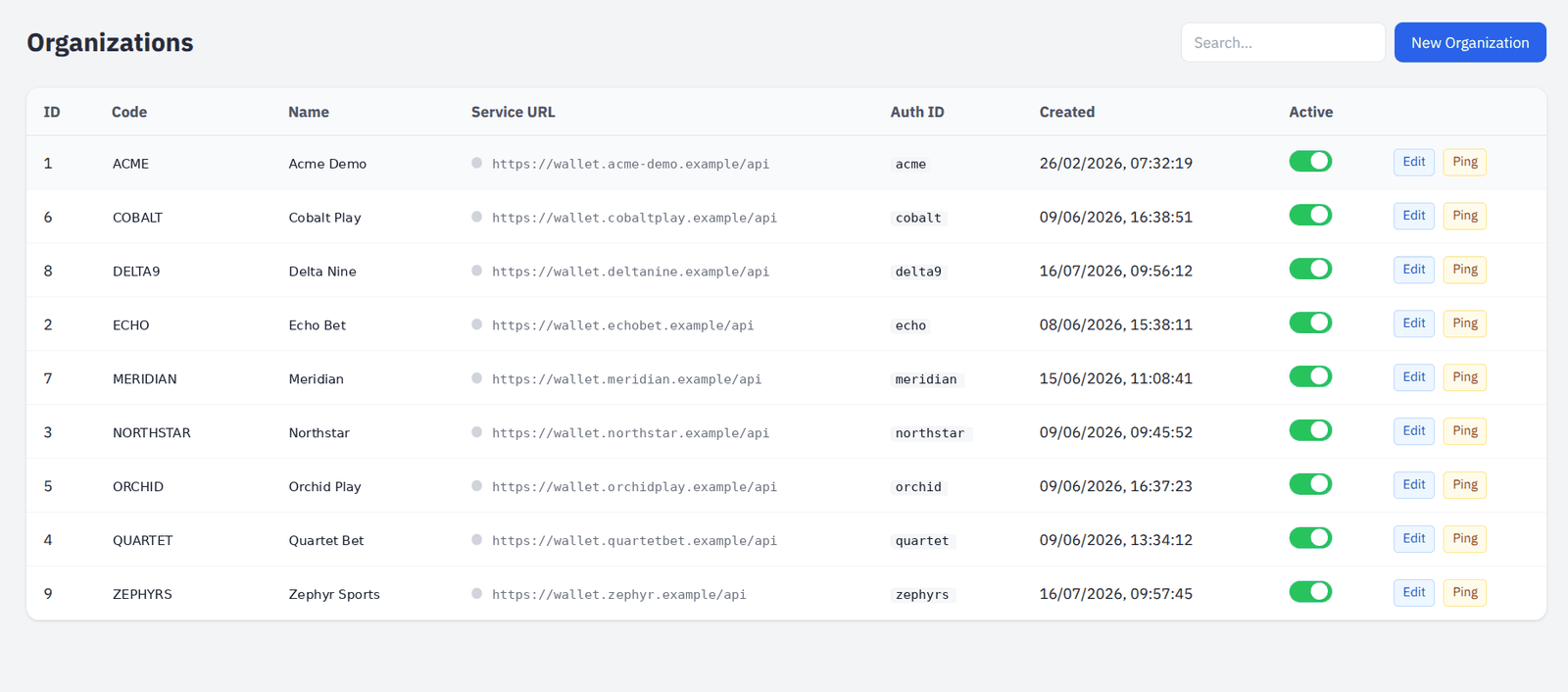
Organisations

Your customers, and how the platform talks to their wallet

Each operator on the platform, with the wallet service the engine calls to debit and credit accounts, the currencies they trade in, and the sports they carry.

An organisation with its wallet service, currencies and sports.
Wallet integration
Service URL and credentials per organisation, with a ping button so a wrong address is caught while somebody is still looking at it.
Currencies
Which currencies the organisation may take bets in.
Sports offered
Which sports appear on the organisation’s sites at all.

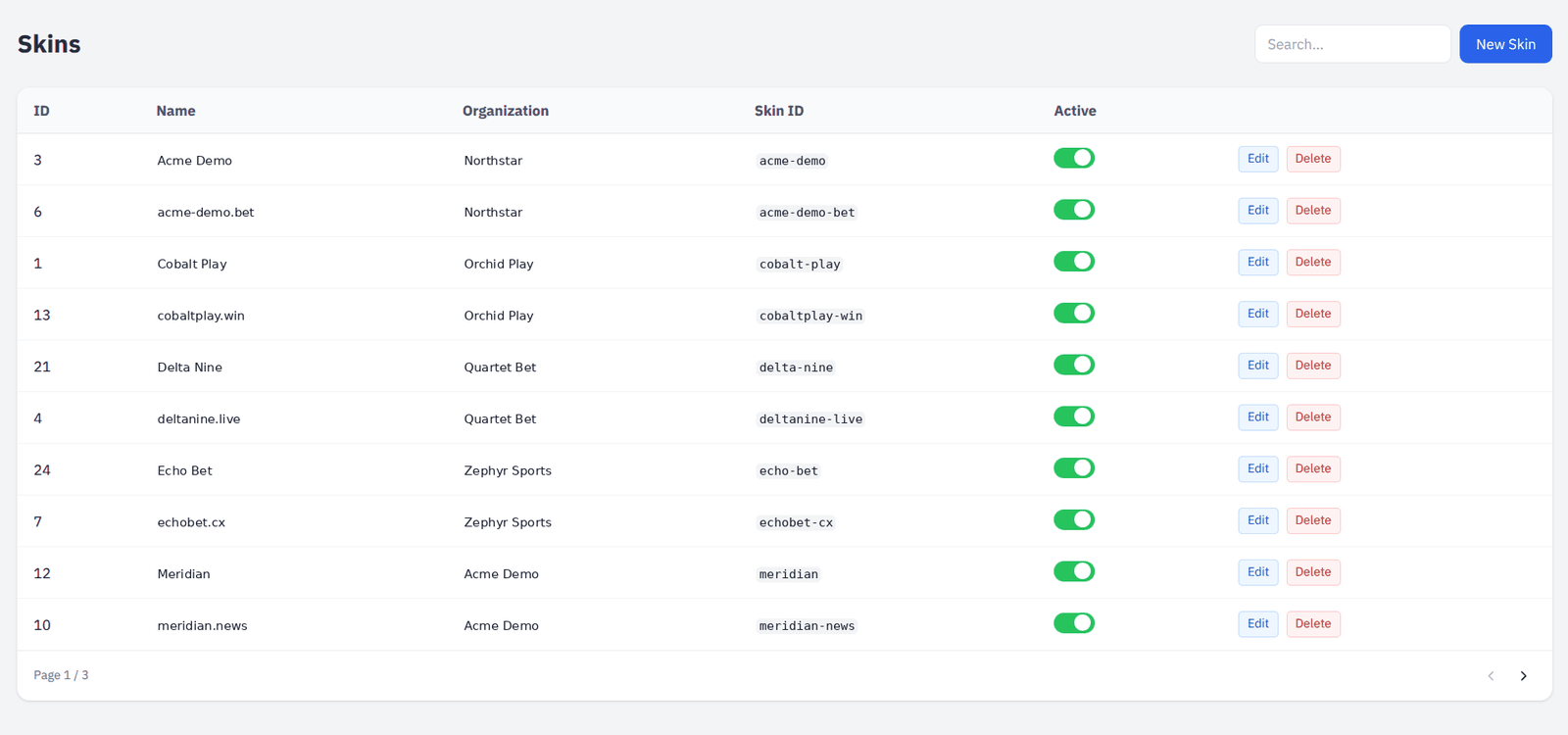
Skins

One brand’s sites — domains, styling and feed

A skin is a single site under an organisation. It carries the domains allowed to embed the widget, the CSS that makes it look like the brand, and the feed network it reads prices from.

A skin with its domains, custom CSS and feed network.
Allowed domains
The origins permitted to load the widget. Saving them refreshes the engine’s CORS list immediately, so a new site works without a restart.
Custom CSS
Per-skin styling served to the widget at runtime — colours, fonts and spacing without a separate build per brand.
Feed network
Which upstream feed this skin prices from.
On and off
Suspend a skin without deleting what is configured behind it.

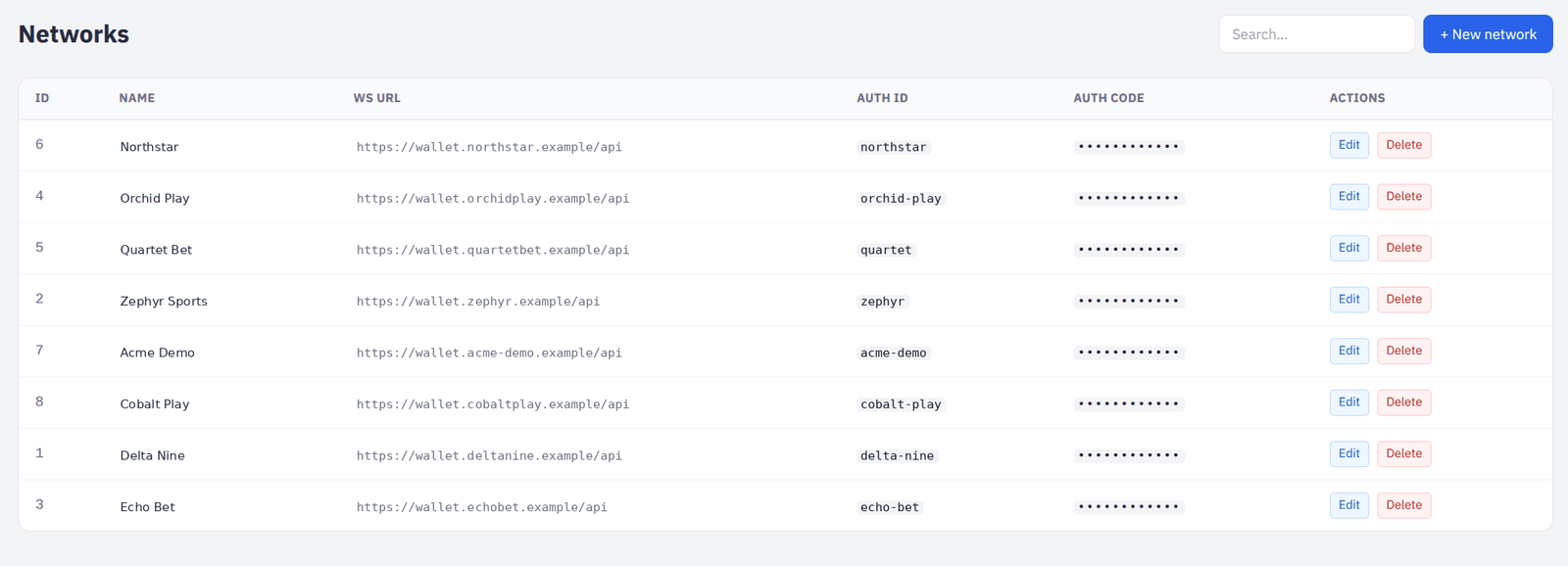
Networks

The player platforms the engine authenticates against

A network is one operator platform: the web service the betting engine calls to check a player’s session and reach their account. Skins point at a network by name, so several brands running on the same platform share one entry.

Networks: one platform endpoint per operator, shared by their skins.
Endpoint and credentials
The service URL, an auth identifier and an auth code, checked on every login. The code is masked in the list — a screen somebody may photograph over a shoulder is no place to print a secret.
Shared by many skins
Brands on the same platform point at one network; changing it once changes it for all of them.
Overridable per organisation
An organisation with its own service URL takes precedence over the network’s — the way a customer who has moved platform is handled without disturbing anybody else pointing at the old one.

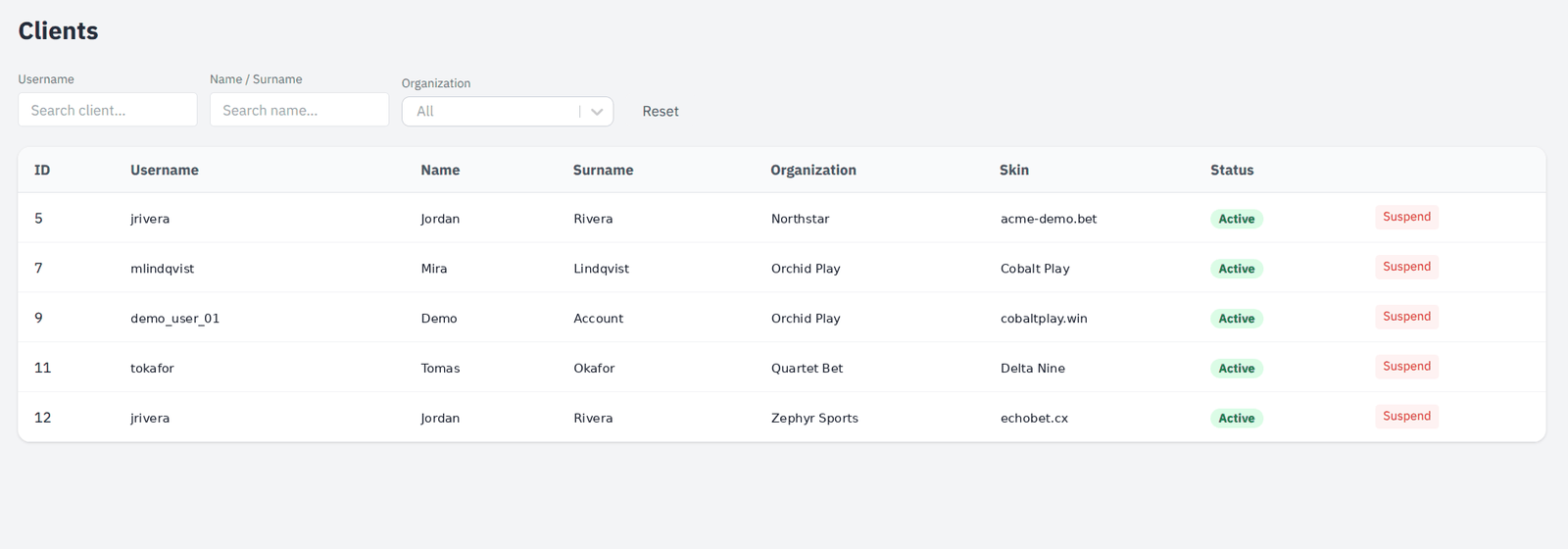
Players

Accounts, and the ability to stop one

Every player registered on any of your skins, searchable by username or name, with the brand they belong to and the ability to suspend an account.

The player directory with brand and status.
Search
By username, by first or last name, and by organisation.
Suspend and reinstate
Stop an account from placing bets, and put it back.
Brand attribution
Which skin the player registered on, and which organisation that skin belongs to.

Access, settings and compliance

Who may do what, how the platform is configured, and the record of what was done — the parts that matter when somebody asks you to prove it.

Users and roles

Six roles, and a boundary the API enforces

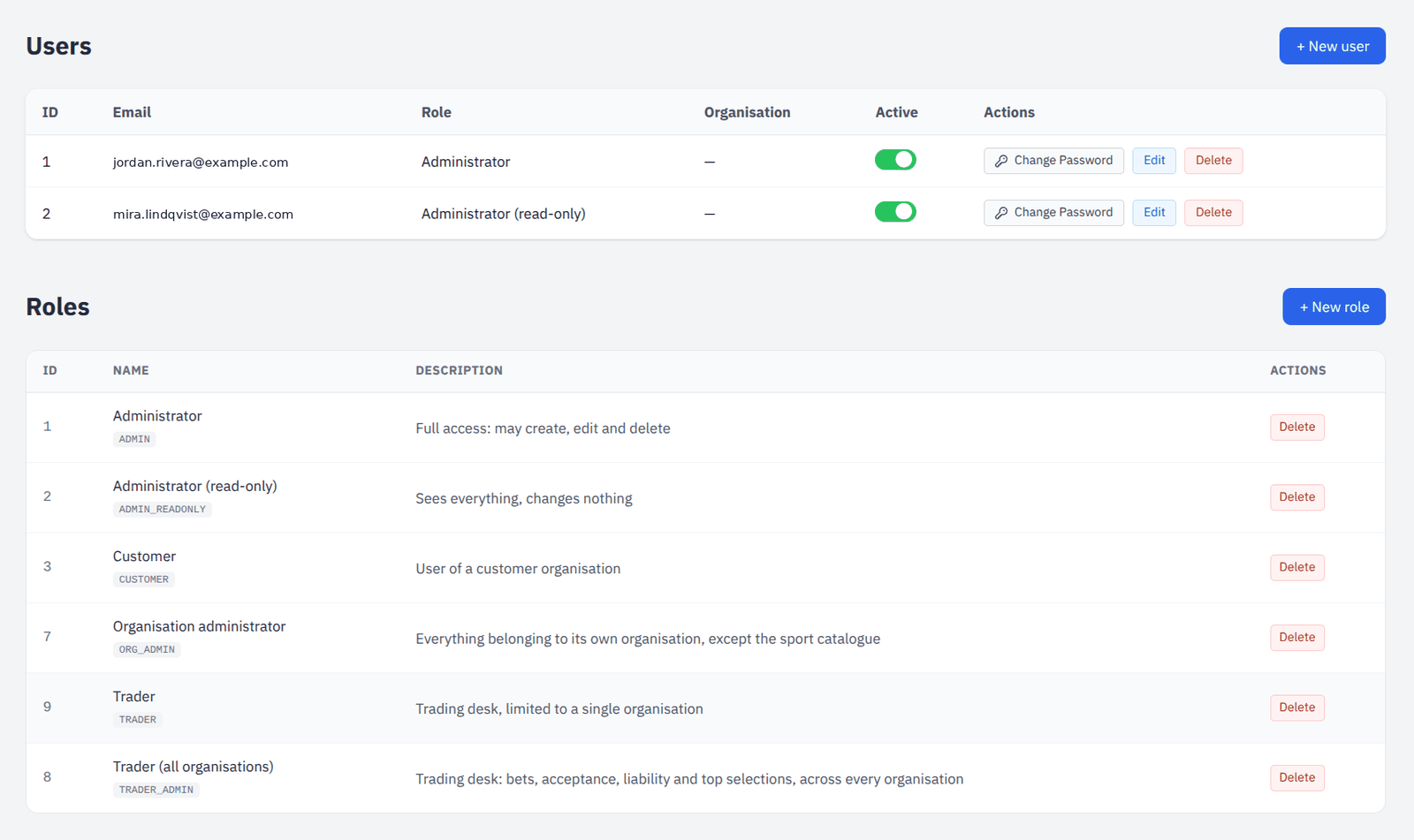
Accounts carry a role, and three of those roles are confined to a single organisation. The confinement is applied on every request in the API, not by hiding menu entries — a hidden link is a courtesy, a refused request is the control.

Users with their role and organisation, and the role catalogue beneath them.
Administrator
The whole platform, with the right to change it.
Administrator (read-only)
Sees everything, changes nothing. The role for auditors and for the first week of a new hire.
Organisation administrator
Everything belonging to its own organisation — bets, players, skins, users, geoblocking, risk rules — and nothing outside it. The shared sport catalogue and platform-wide settings are not its business.
Trader (all organisations)
The trading desk only: bets, the acceptance queue, liability and top selections, across every brand on the platform.
Trader
The same desk, confined to one organisation.
Customer
An organisation’s own end-user account.
No self-promotion
An organisation administrator can create users inside its own organisation but cannot grant a role that would see outside it — the escape route an otherwise sensible design leaves open.

Geoblocking

Where you accept play, per brand

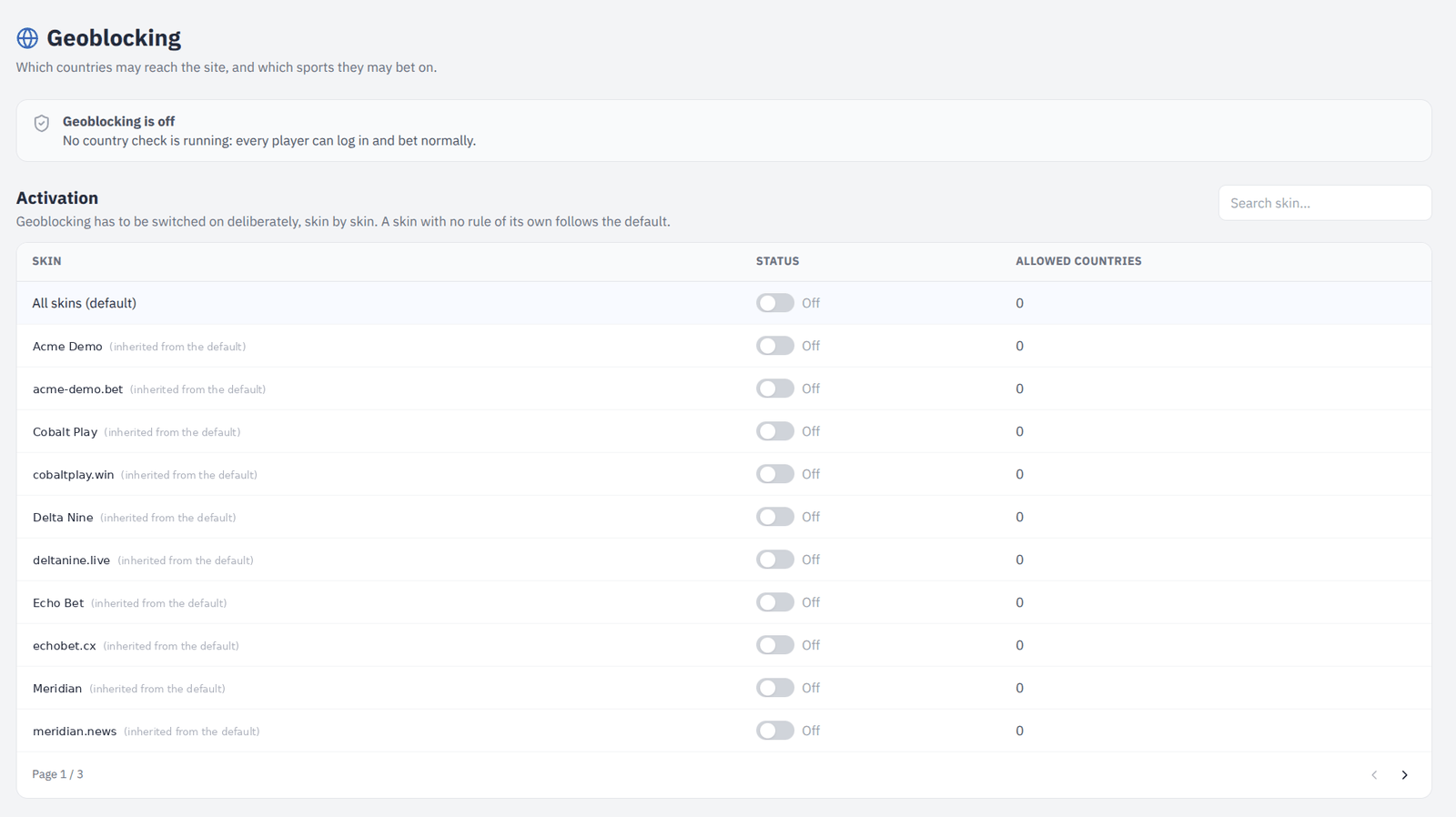
An allowlist of countries per skin: with the policy on, a country is refused unless it appears. Individual sports can be excluded inside a country that is otherwise allowed.

Per-skin country allowlists and sport exclusions.
Allowlist, per skin
Each brand carries its own list, with a platform-wide default for the skins that have not been given one.
Sport exclusions
Allow a country but withhold a particular sport in it — the shape most licensing conditions actually take.
Provider choice
DB-IP or MaxMind, or automatic. MaxMind credentials are entered once and never read back out.
What to do when the address is unknown
Allow or block, chosen explicitly, because a silent default here is either a compliance gap or a lost customer.

Settings

The platform’s knobs, in one place, in four tabs

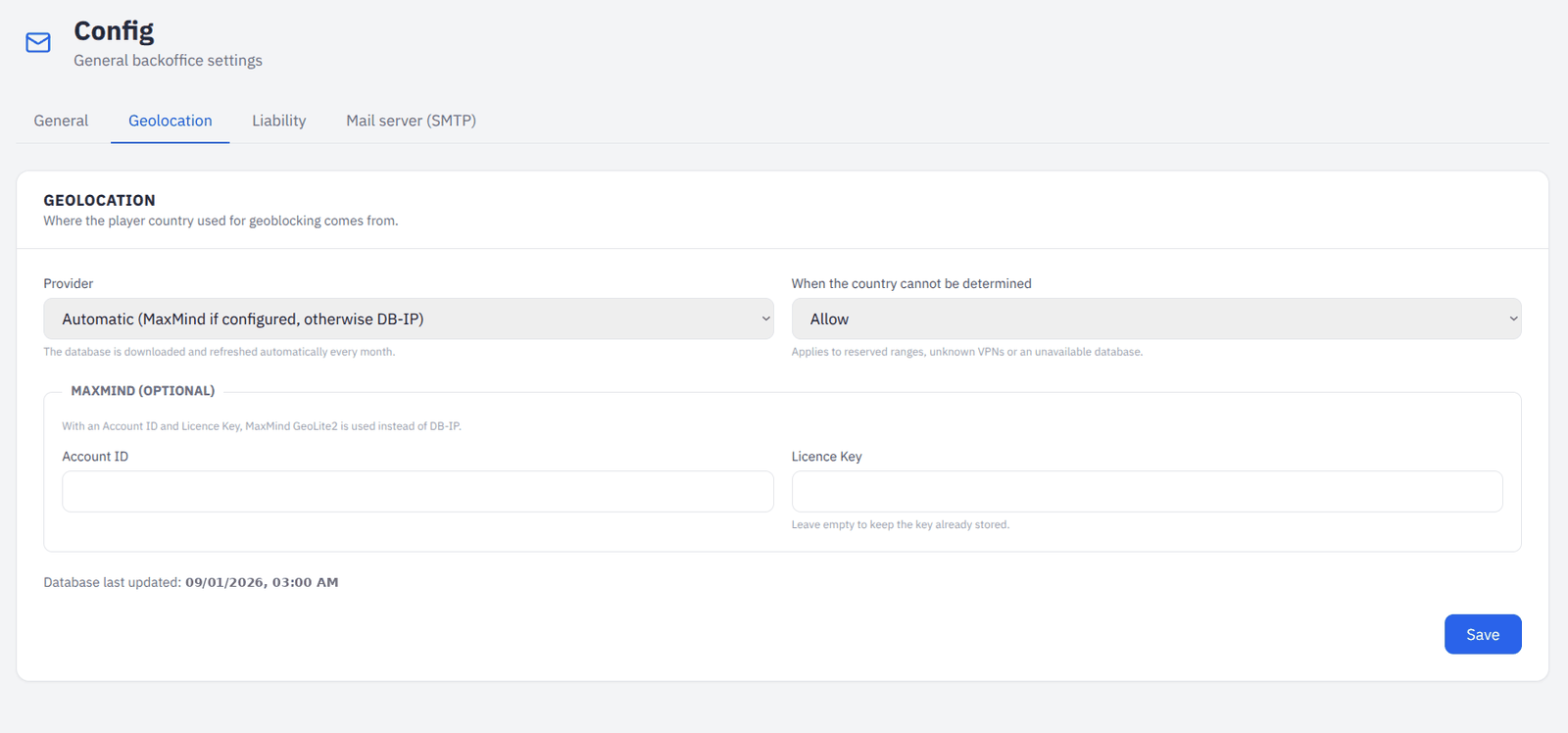
General, geolocation, liability and mail. Everything that would otherwise be a deployment.

The four tabs, with geolocation open: provider, fallback and the optional MaxMind credentials.
General
The public base URL used in outgoing links, and the number of rows a table shows by default.
Geolocation
Provider, credentials, what to do with an unresolved address, and when the database was last updated.
Liability
Monitor on or off, minimum exposure, concentration percentage, default suspension length, scan interval, and whether a proposal is withdrawn when its concentration falls back below the trigger.
Mail
SMTP host, port, credentials and sender, with a test message so a wrong password is found now rather than the first time a password reset is needed.

Audit log

Who did what, and when

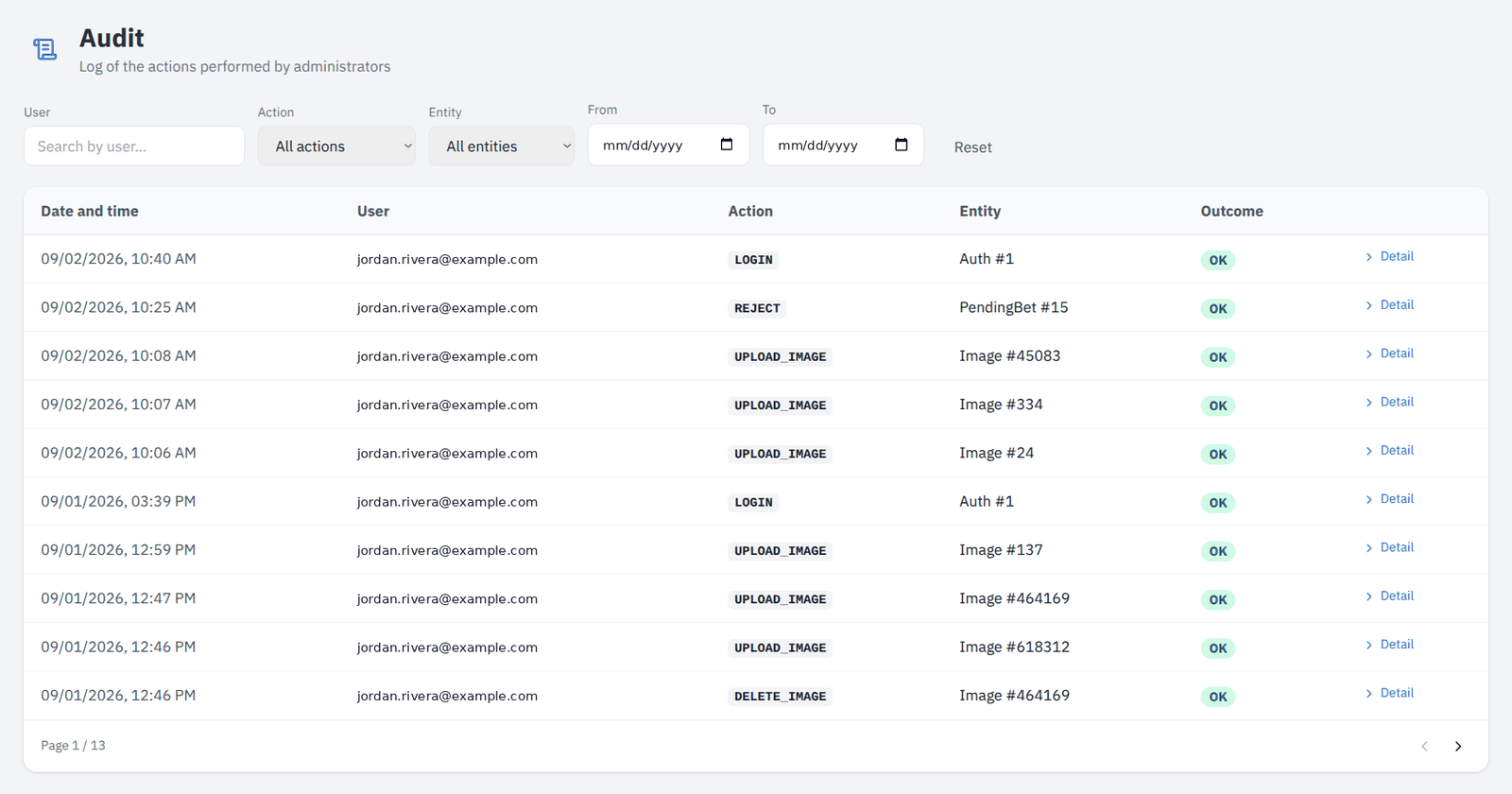
Every action recorded with the account behind it. There is deliberately no endpoint that edits or deletes an entry: a trail an administrator can rewrite is not a trail.

The audit log with its filters.
Logins, successful and not
Failed attempts are recorded too — they are what makes an access log useful for spotting a stolen username.
Filters that match the question
By user, action, entity type and date range.
Scoped like everything else
An organisation administrator reads its own organisation’s actions, and the filter dropdowns only offer values that can appear in them.

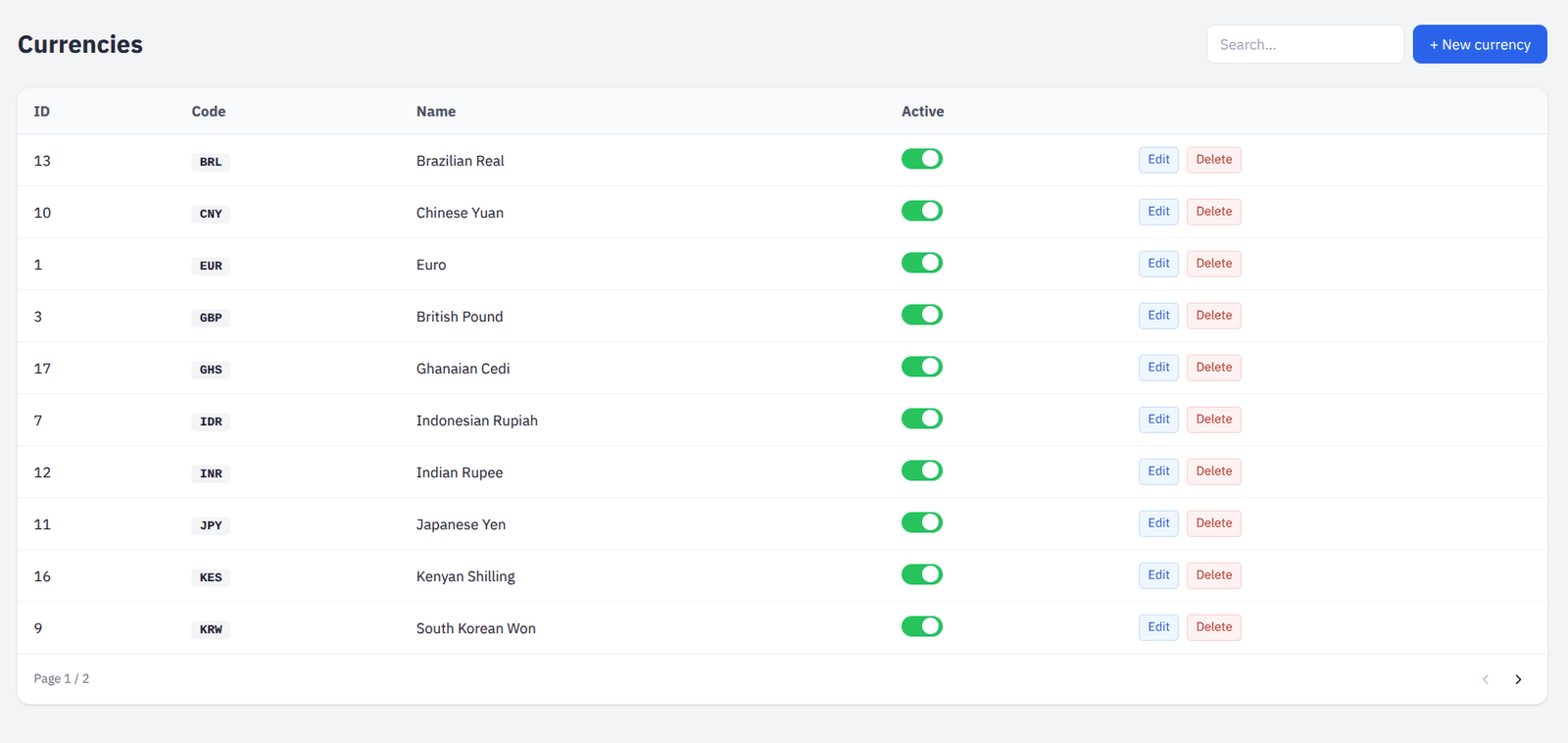
Currencies

What the platform can take money in

The currency catalogue, with the symbol and decimal handling each one needs, assigned to organisations from their own page.

The currency catalogue.
Symbol and formatting
How an amount is rendered wherever it appears.
Assigned per organisation
A brand offers only the currencies it has been given.

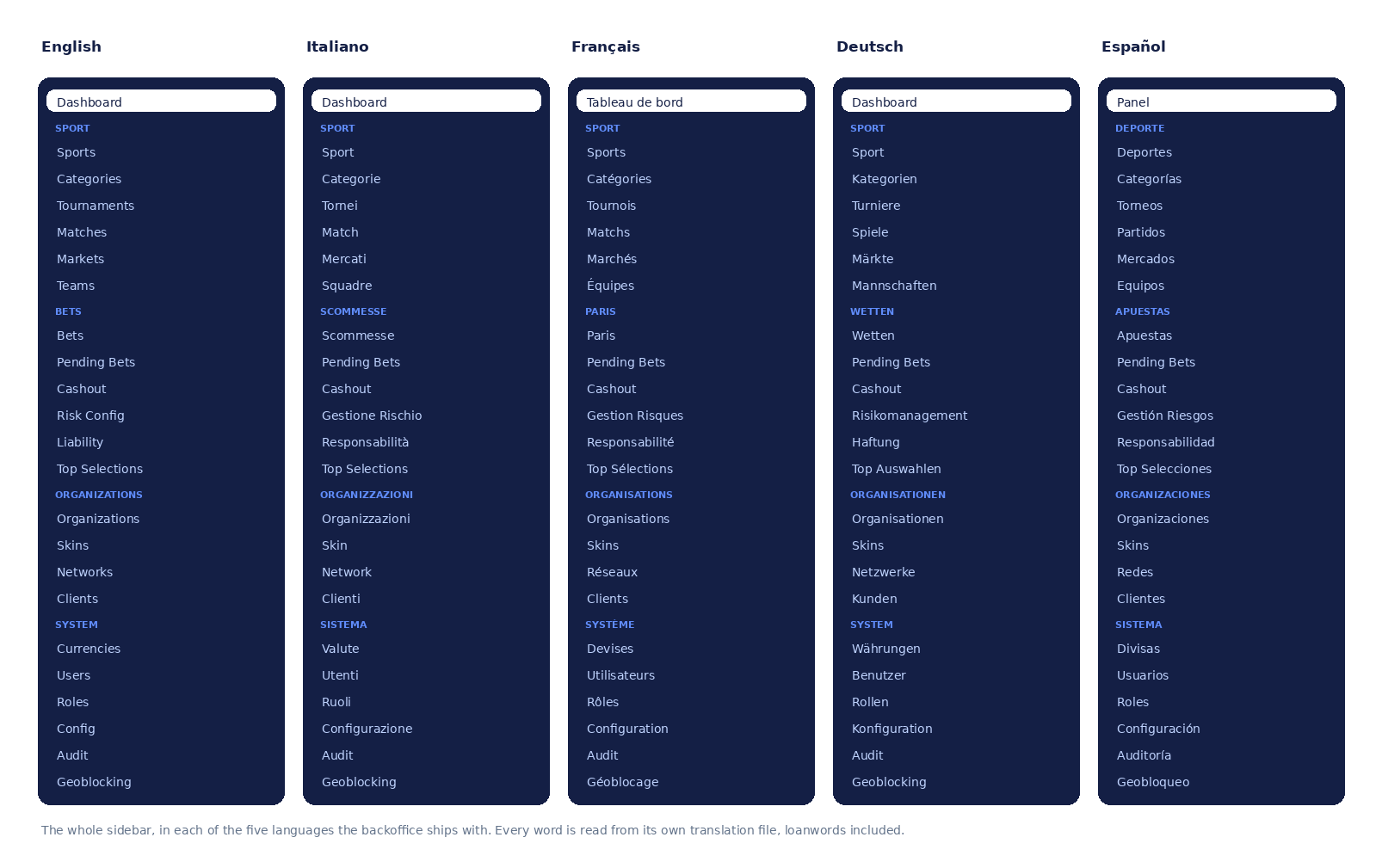
Five languages

The backoffice speaks the language of whoever opens it

English, Italian, French, German and Spanish, switched per user and remembered. Error messages come back from the API as codes and are translated on the page, so a failure reads in the operator’s language rather than the server’s.

The whole sidebar in all five languages. Drawn from the translation files themselves, not captured.
Complete, not partial
The translation files are typed against each other, so a missing key fails the build instead of leaking a placeholder into the interface. Between 88% and 95% of the strings differ from the English; the rest are the words every language borrows — Admin, Sport, Audit.
Errors too
The API answers with a code rather than a sentence, and the page translates it. A refusal reads in the operator’s language rather than the server’s.
Numbers and dates follow the language
Not pinned to one locale, so an English backoffice does not print continental decimal separators.

Seen enough to want a look inside?

A demo runs on real data with your own brand configured, so you are judging the product rather than a slide deck.

Request a demo